Warehouse Bin Location System for Small Warehouses
A messy location structure creates hidden costs in small warehouses. Pickers walk farther than they should, new hires take too long to learn the floor, receiving puts stock wherever there is space, and cycle counts turn into investigations. A solid warehouse bin location system fixes those problems by giving every storage position a clear address and every movement a standard process.
For small operations with 5 to 50 employees, the goal is not to build an enterprise-level maze of codes. It is to create a location system that is simple enough for the team to follow every day and strong enough to support growth, faster picking, and better inventory control. This guide shows how to design that system, label it, roll it out, and manage it in a warehouse management system.
Why small warehouses need a formal bin location system
Many small warehouses start with informal storage rules: fast movers near packing, bulk on the back wall, overflow wherever space opens up. That works for a while. Then SKU counts rise, one customer adds kitting, another requires lot control, and suddenly nobody is fully sure where product lives.
A formal bin location system improves operations in four ways:
- Faster picking: workers go to an exact location instead of searching by memory.
- Lower error rates: unique addresses reduce wrong-item and wrong-location mistakes.
- Easier training: new staff can learn location logic in hours instead of weeks.
- Better inventory visibility: every SKU can be tied to one or more known storage positions.
In practical terms, even a small warehouse can often cut 10% to 25% of search and travel waste after cleaning up location logic, especially if stock has been stored inconsistently.
What a warehouse bin location system should include
At minimum, your system should identify each storage position uniquely and tell the team how to interpret it. The most common structure is built from physical hierarchy.
The basic location hierarchy
- Zone: a broad area such as Receiving, Pick Face, Bulk, Returns, or Cold Storage.
- Aisle: a numbered or lettered row.
- Bay: a rack section or span within an aisle.
- Level: vertical position such as floor, shelf 1, shelf 2, pallet beam 1, beam 2.
- Position or Bin: left/right or bin number on the shelf level.
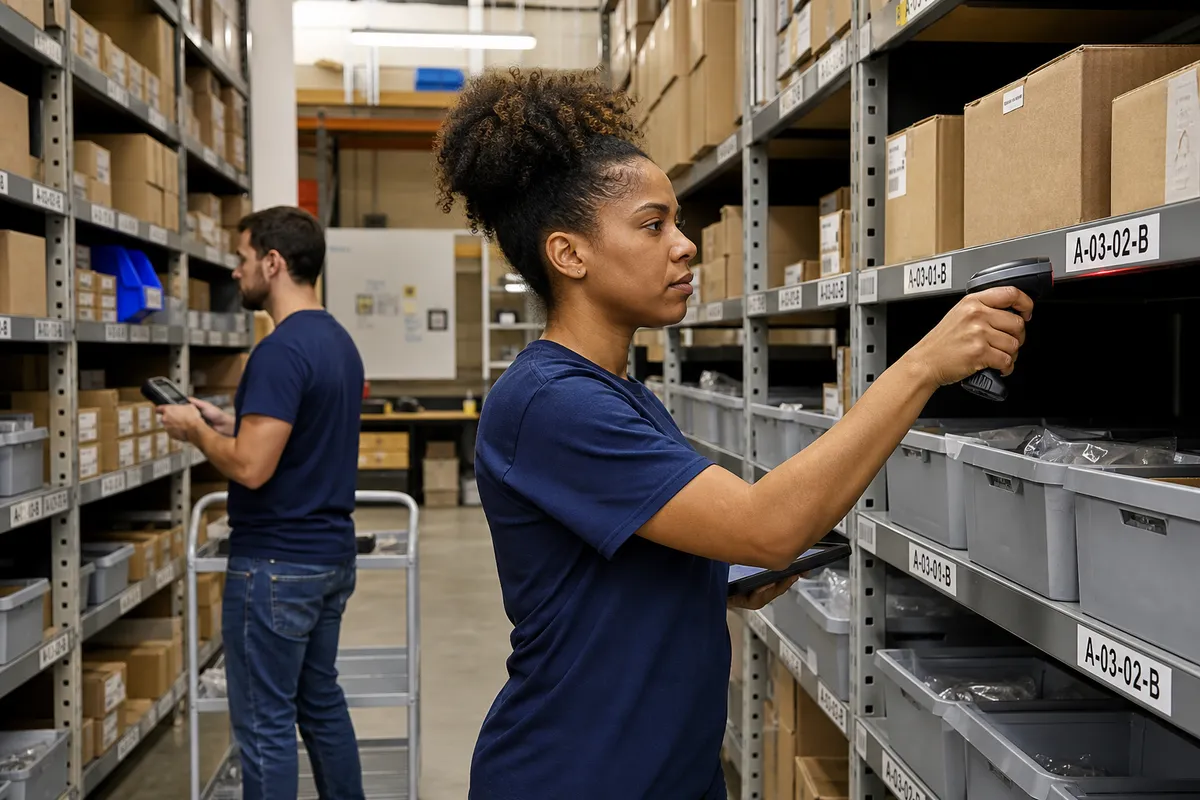
A sample format might be P-04-07-2-B:
- P = Pick zone
- 04 = Aisle 4
- 07 = Bay 7
- 2 = Level 2
- B = Right-side bin or second slot
The code should be readable by people, not just software. If a team member cannot understand a location label at a glance, the format is too complicated.
Characteristics of a good naming convention
- Each location is unique.
- The format is consistent across the building.
- The sequence follows the physical walking path.
- It leaves room to add new aisles, bays, or zones later.
- It avoids ambiguous characters like O and 0 or I and 1 where possible.
If you want a useful benchmark, try to keep most location codes between 7 and 14 characters. Long enough to be specific, short enough to read quickly.
How to design bin locations for a small warehouse
1. Map the current storage reality
Before naming anything, walk the floor and document what you actually have, not what is on an old layout drawing. Note:
- Rack rows and shelving runs
- Floor stack areas
- Carton flow or pick shelves
- Secure cages
- Returns and quarantine zones
- Packing supply areas
If the building has mixed storage types, your naming system must handle all of them. Do not create a beautiful rack code format that ignores floor pallets, staging lanes, or non-conforming inventory.
2. Define zones based on process, not just space
Zone labels should reflect how work flows. Good examples include:
- RCV for receiving inspection and check-in
- PK for forward pick locations
- RES for reserve storage
- RET for returns
- HLD for quality hold or quarantine
- KIT for kitting components
Process-based zones help employees make better decisions. If product is found in HLD instead of PK, that signals a status issue, not just a location issue.
3. Number aisles and bays in travel order
This is one of the most overlooked details. Number locations in the same order that pickers or putaway staff walk them. If the normal path starts at the front-left corner and snakes clockwise through the warehouse, your aisle sequence should follow that path.
Why it matters: a logical sequence supports paper picking, scanner navigation, and visual sanity checks. A random numbering system increases backtracking and makes pick path optimization harder later.
4. Decide how granular each location needs to be
Not every storage area needs the same precision. A carton shelf may need individual bin positions, while a bulk pallet lane may only need aisle-bay-level.
Use this simple rule:
- High-touch picking areas: use more detail.
- Reserve or overflow areas: use enough detail to prevent lost stock.
- Temporary staging: define clearly, but keep formats simple and time-limited.
If a picker must choose between two adjacent totes on the same shelf, then those two positions need separate location IDs.
Fixed, flexible, or hybrid locations?
Small warehouses often ask whether every SKU should have a permanent home. The answer depends on volume, variability, and available space.
Fixed locations
With fixed locations, each SKU gets a designated home bin. This works best for:
- Fast-moving SKUs
- Core catalog items
- Items that require quick training and easy finding
Pros: easy to learn, simple to pick, strong visual control.
Cons: can waste space if inventory levels fluctuate a lot.
Flexible locations
With flexible locations, incoming stock can go into any available approved space, tracked by the system.
Pros: better space use, useful for variable inventory profiles.
Cons: depends heavily on disciplined scanning and system accuracy.
Hybrid locations
Most small warehouses do best with a hybrid approach:
- Primary pick bins are fixed.
- Reserve and overflow stock can move to flexible locations.
- Replenishment moves stock from reserve into fixed pick faces.
This model gives you speed where it matters and flexibility where it saves space.
Labeling rules that make locations usable
A location system only works if people can see and trust it. Labels should be readable from the distance at which workers make decisions.
Practical label standards
- Use large text for aisle and bay identifiers visible from at least 20 to 30 feet.
- Use consistent placement on every rack, shelf, or floor position.
- Add barcodes for scan validation where possible.
- Use durable materials that resist dust, forklift contact, and temperature conditions.
- Do not cover labels with stretch wrap, overhang, or handwritten notes.
For safety and visual clarity, make sure labels do not interfere with required signage and markings. OSHA provides general guidance on maintaining safe, legible workplaces at OSHA warehousing resources.
Avoid these common mistakes
- Using different naming styles in different sections
- Skipping numbers without documentation
- Reusing retired location codes too quickly
- Creating labels too small for actual operating distance
- Letting workers invent unofficial nicknames for locations
If your team says things like “the third shelf near the fan” or “the old returns rack,” the formal system is not strong enough yet.
How to set bin location rules inside a WMS
A spreadsheet can list locations, but it cannot reliably enforce movement rules. In a WMS, locations become operational controls, not just references.
In a system like StockRoute, you should define locations with attributes such as:
- Pick, reserve, staging, hold, or returns type
- Active or inactive status
- Allowed product families or handling constraints
- Capacity limits by units, cases, or pallets
- Replenishment relationships between reserve and pick bins
Minimum WMS controls to enable
- Directed putaway: guide receivers to valid open locations instead of allowing ad hoc storage.
- Scan validation: require workers to scan the location and item during moves, picking, or replenishment.
- Location-level inventory visibility: show exactly what is stored in each bin.
- Location restrictions: block picking from hold or quarantine zones.
- Move history: keep transaction records for troubleshooting and audits.
If you are comparing approaches, our blog covers many practical warehouse control topics that pair well with location management.
A simple rollout plan for small teams
The biggest risk is trying to relabel everything in one weekend without testing. A phased rollout usually works better.
Phase 1: Design and test one zone
- Create the naming convention.
- Label one aisle or one process zone.
- Load locations into your WMS or master file.
- Run real receiving, putaway, picking, and counting in that test zone.
Watch for confusion points. Are workers reading left-to-right correctly? Are shelf levels obvious? Are floor locations distinct from rack positions?
Phase 2: Clean the master data
Before full rollout, confirm:
- Every active SKU has at least one valid storage strategy.
- Primary pick locations are assigned where needed.
- Obsolete and duplicate locations are removed.
- Temporary storage spots are either formalized or eliminated.
Phase 3: Expand zone by zone
Roll out in manageable sections, ideally during lower-volume periods. For each section:
- Label the physical locations.
- Move or verify inventory.
- Update the system.
- Train the relevant staff.
- Audit for 3 to 5 days.
A small warehouse can often convert 1,000 to 3,000 locations this way without shutting down operations, provided the team works in sequence.
How to measure whether the new system is working
Do not judge success by whether labels look neat. Judge it by operating results.
Track these metrics for 30 to 60 days
| Metric | Why it matters |
|---|---|
| Pick time per order | Shows whether location logic is reducing travel and search time |
| Mis-picks by count or percent | Indicates whether locations are preventing selection errors |
| Putaway compliance | Measures whether stock is actually going to assigned valid bins |
| Inventory found-not-found incidents | Highlights bad location discipline or master data issues |
| Cycle count adjustments by location | Reveals problem zones and training gaps |
As a rough benchmark, if your warehouse currently relies on tribal knowledge, a successful location rollout should produce visible improvement within the first month. If it does not, the usual causes are weak scanning discipline, poor signage, or too many exceptions.
For broader warehousing best practices and terminology, the Warehousing Education and Research Council has long published useful operational guidance: https://www.werc.org.
Common bin location problems and how to fix them
Problem: overflow keeps breaking the system
Fix: create formal overflow zones with clear rules and system visibility. Unofficial overflow is one of the fastest ways to lose inventory control.
Problem: the same SKU is spread across too many bins
Fix: set slotting and replenishment rules that limit active pick faces. Too many split locations increase search time and counting complexity.
Problem: people skip scans because the process feels slow
Fix: shorten travel and simplify steps before blaming labor. If workers must navigate clutter or unreadable labels, compliance drops. Good process design improves scan compliance.
Problem: labels get damaged or disappear
Fix: add a monthly location audit. A bin location system needs preventive maintenance just like racks, scanners, and printers.
What a mature small-warehouse location system looks like
You do not need robotics or advanced automation to run a disciplined location model. A mature system in a small warehouse usually has these traits:
- Every storage position has a unique readable ID.
- Every active SKU has a clear putaway and picking rule.
- Receivers do not decide locations from memory.
- Pickers do not hunt for product.
- Supervisors can see inventory by exact bin.
- Cycle counts focus on variance, not scavenger hunts.
That level of control creates a foundation for almost every other warehouse improvement, from replenishment to labor planning to cleaner order fulfillment.
Conclusion
A well-built warehouse bin location system is one of the highest-return operational upgrades a small warehouse can make. It does not require a giant budget. It requires a clear naming convention, labels people can read, process rules the team follows, and software that keeps locations accurate over time.
If your operation is still relying on memory, informal shelf names, or spreadsheets that cannot validate location moves, now is the right time to tighten control. Explore StockRoute features to see how location management, barcode workflows, and inventory visibility can support a cleaner warehouse operation. When you are ready, start with a trial or plan review on our pricing page, or contact us to talk through your setup.